Formulas#
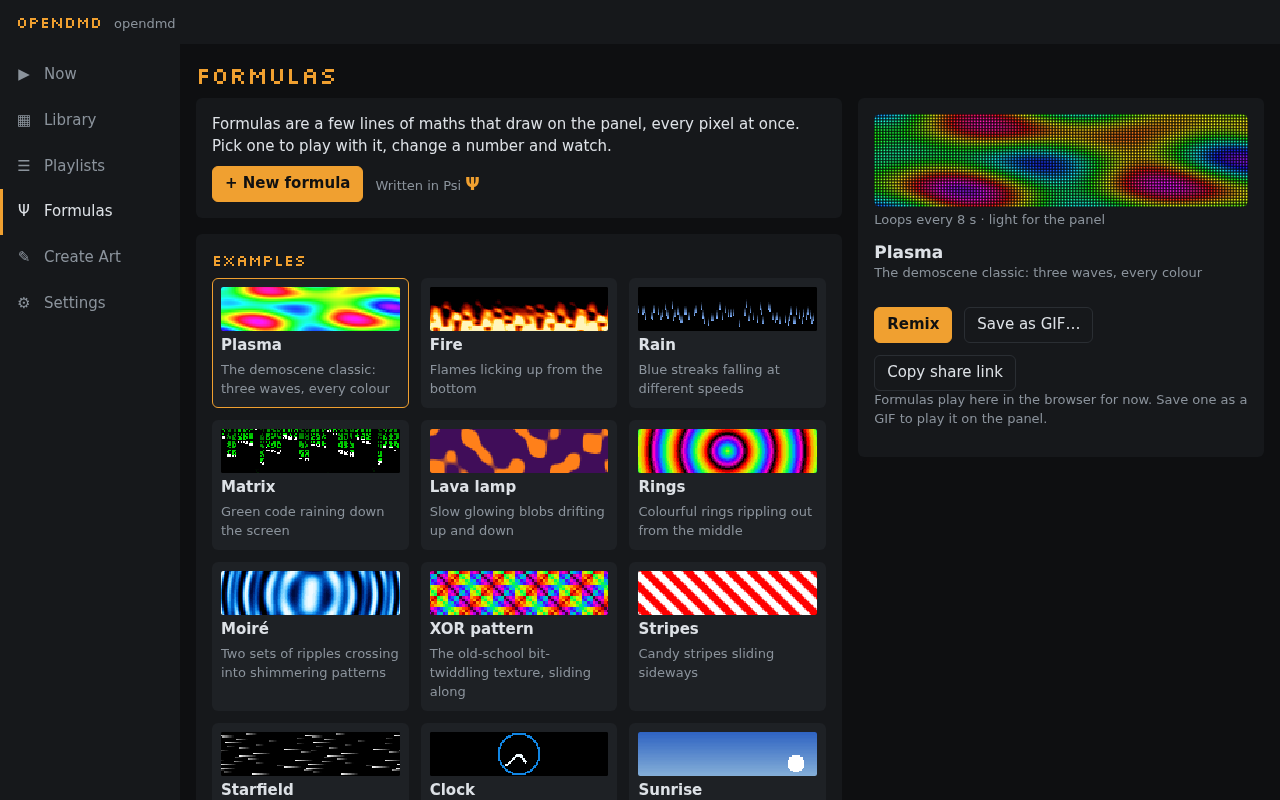
A formula is a few lines of maths that draw on the panel, every pixel at once. Change a number and the picture changes as you type. Formulas are written in Psi (Ψ), OpenDMD's small language for the panel's pixels, but you don't need to know it to start: open an example, drag a number, and watch.
Open Formulas (Ψ) in the app's menu. Formulas work in the online demo too, with no player at all.
The gallery#
Formulas opens on the examples (Big clock, plasma, fire, rain, a clock face, and more) and the formulas you've saved. Pick one to see it playing in the panel look, with its sliders if it has any.
Big clock, the first example, shows what a GIF can't do: it draws the real time in big rainbow digits, with a bar along the bottom that fills once a minute, a step a second. Check it against your watch. A GIF can't know the time; one that only showed each minute of a day would already be 2.7 MB, and with the seconds and the moving colours it would be gigabytes. The formula is under 1 KB, most of it comments.
From there:
- Remix (an example) or Edit (one of yours) opens it in the editor.
- Save as GIF… makes a GIF of it in Create Art.
- Copy share link gives you a link to its own page, for anyone (see Sharing).
- + New formula starts a fresh one.
If you leave the editor without saving, the gallery offers Continue editing at the top, and the app asks before anything replaces it.
On your player, Show on panel plays a formula there until the playlist moves on; save it as a GIF to keep it. Formulas that draw over a GIF have their own section, Over a GIF.
The editor#
The preview is on top (on a phone it stays in view while you scroll) and the formula underneath; the preview follows as you type. Under it, a line says how long the loop is (or that the formula follows the clock) and how hard it is for the panel. If something is wrong, the editor says what in plain words just above the formula, marks the place, and keeps playing the last version that worked, dimmed.
- Drag a number left or right to try other values. On a computer, drag it right in the text, or put the cursor on it and press Alt + ↑ or ↓ (Shift for bigger steps). On a phone, tap a number and drag the bar that appears under the formula, or use its − and + buttons. Numbers can go below zero. Ctrl+Z (⌘Z) undoes a whole drag at once.
- Sliders: a formula that uses
a,borcgets a slider for each, 0 to 1. A comment like-- a: speedgives the slider a name. - Cheat sheet lists everything the language has, with a line on each. Tap a name to put it in.
- Save keeps the formula in this browser, under its name.
A plasma in two minutes#
Press + New formula, clear the text, and build it up line by line.
- Start with a gradient.
xgoes from 0 at the left edge to 1 at the right, andgrayturns a number from 0 to 1 into black to white:
gray(x)
- Make waves.
singoes up and down between −1 and 1 once for every 1 it is given, sox*2gives two waves across the panel. Halve it and add a half to keep it between 0 and 1:
gray(sin(x*2)*0.5 + 0.5)
- Set it moving.
tis the time in seconds;loop 8makes the loop eight seconds long, andt/8moves the wave once along in that time, so it loops without a jump:
loop 8
   gray(sin(x*2 + t/8)*0.5 + 0.5)
- Add a second wave going up and down the panel (
yis 0 at the bottom, 1 at the top), moving the other way and twice as fast. Give the sum a name:
loop 8
   wave = sin(x*2 + t/8) + sin(y*1.5 - t/4)
   gray(wave/4 + 0.5)
- Colour it.
hsvtakes a hue (once round the rainbow for every 1), a saturation and a brightness. Let the wave pick the hue, and turn the rainbow once a loop:
loop 8
   wave = sin(x*2 + t/8) + sin(y*1.5 - t/4)
   hsv(wave/4 + t/8, 1, 1)
- One more wave, on a slant, and it's the Plasma example:
loop 8
   wave = sin(x*2 + t/8) + sin(y*1.5 - t/4) + sin(x*1.5 + y + t/8)
   hsv(wave/6 + t/8, 0.9, 1)
Now drag the 2 in x*2, or the 0.9, and see what happens.
The language#
A formula is a few lines: names you set (wave = …, each name once), and a
colour on the last line. It is worked out for every pixel, every frame.
-- starts a comment. Everything is a number; there are no loops, lists or
words (a single character in quotes, 'A', is a number too: its code).
Values
| name | what |
|---|---|
x, y |
where the pixel is: 0 to 1 across (left to right) and up (bottom to top) |
px, py |
the pixel's column, 0–127, and row from the bottom, 0–31 |
i |
the pixel's number, 0–4095, from the top left |
t |
seconds into the loop |
hour, minute, second |
the time of day |
a, b, c |
the sliders, 0 to 1 |
w, h |
128 and 32 |
cx, cy |
where the pixel is from the middle, in panel heights: cx from −2 at the left edge to 2 at the right, cy from −0.5 at the bottom to 0.5 at the top |
r, angle |
how far the pixel is from the middle (round, though the panel is 4 times wider than tall: r < 0.4 is a disc), and its angle round the middle, in turns |
ty |
the pixel's row counted from the top, 0–31 |
Functions. Waves and angles are in turns, not degrees or radians:
sin(0.25) is 1, and sin repeats every 1.
| function | what |
|---|---|
sin(v), cos(v) |
a smooth wave between −1 and 1 |
tri(v), saw(v), sqr(v) |
triangle, sawtooth and square waves, −1 to 1 |
abs(v), floor(v), frac(v), sqrt(v) |
size, whole part, fraction, square root |
min(a, b), max(a, b), clamp(v, lo, hi) |
limits |
mix(a, b, k) |
from a to b as k goes from 0 to 1 |
step(edge, v) |
1 when v is past edge, else 0 |
smoothstep(e0, e1, v) |
a soft step from 0 to 1 |
len(dx, dy) |
the distance, √(dx² + dy²) |
atan2(dy, dx) |
an angle, in turns (−½ to ½) |
noise(x, y, z) |
smooth random hills, 0 to 1 |
hash(a, b) |
a random number, 0 to 1 |
c ? a : b, select(c, a, b) |
a when c is true (not 0), else b |
digit(n, col, row) |
1 where digit n (0 to 9) has a pixel in the panel's font, else 0 |
glyph(ch, col, row) |
the same for a character: glyph('A', col, row) |
bit(n, i) |
bit i of the whole number n, 1 or 0, for patterns of your own |
pick(k, a, b, …) |
a when k is 0 (up to 1), b when it is 1, and so on; 0 below 0 or past the last |
Digits and letters. digit and glyph read the panel's own font, the
one the clock and the title cards use: a character is 5 columns by 7 rows
(col 0 to 4 from the left, row 0 to 6 from the top; a digit uses
columns 0 to 3 and rows 0 to 5, the rest is the gap to the next one).
Anything outside that, or a character the font hasn't, is 0, so a
character drawn big is just its column and row worked out from the pixel:
digit(7, floor(px/4), floor(ty/4)) draws a 7 four times the size in the
top-left corner (rows count down from the top here, as ty does; py
counts up). pick chooses which character goes where:
glyph(pick(floor(px/5), 'H', 'I'), px % 5, ty) writes HI in the top
left, and nothing after it. Add small for the smaller font, 4 by 6 (digits 3 by 5):
digit(n, col, row, small), or bold for chunky 3 by 5 digits (digits
only): digit(n, col, row, bold). Big clock is made this way, in
bold.
Operators: + - * / %, comparisons < <= > >= == != (1 for true, 0 for
false), and and, or, not. There is no power operator: write x * x.
Colour (the last line):
| colour | what |
|---|---|
hsv(hue, sat, val) |
hue in turns; saturation and brightness 0 to 1 |
rgb(r, g, b) |
red, green and blue, 0 to 1 each |
pal(name, v) |
a palette, v from 0 to 1: fire, ice (or ocean), chrono, amber, rainbow, gray |
gray(v) |
black to white |
#ff8800 |
a colour by its red, green and blue, two hex digits each (#f80 for short) |
A last line that is just a number is gray of it.
Colours by name. #ff8800 is a colour, the way web pages write them.
It can be the whole last line, and you can do sums with colours there:
#ff8800 * k is that orange at brightness k, mix(#102040, #ff8800, y)
goes from dark blue at the bottom to orange at the top, and
pick(k, #ff0000, #00ff00) picks one. rgb(#ff8800, k) covers only k
of the pixel. A colour can't be given a name of its own (c = #ff8800 is
an error): write it in the last line, where it is used. In the editor a
colour is underlined in its own colour.
The loop and the frame. loop N on a line of its own sets how long
the loop is, in seconds (8 if you leave it out). For a seamless loop,
everything that moves should come back to where it started: use t/N,
t*2/N and so on with the loop's own N. Values inside frame { … }
are worked out once a frame rather than for every pixel; they can't use
the pixel's position.
Layers. A formula can be a stack of layers, bottom to top, each with its own names and its own colour on its last line:
loop 4
layer {
  wave = sin(x*2 + t/4) + sin(y*1.5 - t/2)
  hsv(wave/4 + t/4, 0.9, 1)
}
layer multiply { gray(py % 2 ? 1 : 0.6) }
The word after layer says how it goes onto what is below it: over
(the default: it covers it), add (lighter), multiply (darker: white
leaves it as it was), screen (lighter, softly), max or min. Names
set outside the layers can be used in all of them; names set inside a
layer are its own, so two layers can each have a v, and you can paste a
whole formula into a layer { … } to combine it with another. loop goes
on its own line outside the layers.
How much it covers. Every colour takes one more value, if you like:
how much of the pixel it covers, from 0 to 1 — rgb(r, g, b, k),
hsv(h, s, v, k), gray(v, k), pal(fire, v, k). Where it covers less
than all, what is below shows through.
Two formulas in one. A formula can hold another one as a part:
loop 16
part bars {
  loop 4
  bar = max(0, 1 - abs(cy - 0.35*sin(t/4))*5)
  bar * #ff9933
}
part rings {
  loop 4
  d = r
  pal(rainbow, frac(d*1.5 - t/2))
}
k = smoothstep(0.25, 0.75, sin(t/16)*0.5 + 0.5)
layer { bars }
layer { rings(x, y, k) }
You don't have to type a part out: in the editor, write
use Rings as ring on a line of its own, with the name of one of your
formulas or an example, and when you move to another line the editor puts
that formula in as part ring { … }, ready to change. Everything you save or
share then has the whole of it, so it works anywhere: if a use line names
a formula there isn't (or the formula you're editing), the editor says so
and won't save or share until it's fixed.
- A part draws nothing until you use it. Its name on its own, as the last
line (of the formula or of a layer), draws it:
layer { rings }. rings(x2, y2)draws it as if each pixel were somewhere else:rings(1 - x, y)mirrors it,rings(frac(x*4), y)repeats it four times,rings(abs(x - 0.5)*2, abs(y - 0.5)*2)folds it like a kaleidoscope.- Like every colour, it takes one more value, how much of the pixel it
covers:
rings(x, y, k). Movingkwithtfades one formula into another (above). rings.dis a value the part sets, here itsd: use one formula's values in another, for example as how much it covers, so one formula decides where the other shows.- Names inside a part are its own: it can use
dorwavewhatever the rest of the formula uses. Inside a part,tfollows the part's ownloop; make the whole formula's loop a multiple of it.
The examples Bars to stars, Rings through stripes and Kaleidoscope are made this way.
Limits. A formula can be 4,096 characters and 256 steps (the editor shows the count). Numbers go from −32,768 to 32,767; past that they stop at the end instead of wrapping round, and dividing by zero gives the biggest number of the right sign rather than an error.
Over a GIF#
A formula can draw over a GIF instead of replacing it: scanlines, a colour grade, a vignette, sparkles, a clock in the corner. Four values say what is under it at the pixel:
| name | what |
|---|---|
ur, ug, ub |
the red, green and blue under the formula, 0 to 1 |
ul |
how bright it is there, 0 to 1 |
The bottom layer, and any colour that covers less than all of a pixel, let it show through. For example, a sepia tone:
rgb(ul*1.1 + 0.08, ul*0.92 + 0.04, ul*0.65)
or scanlines, which keep the GIF and darken every other row:
layer multiply { gray(py % 2 ? 1 : 0.55) }
The examples' Over a GIF section has more. In the editor and in a
formula's details, such a formula is drawn over a sample picture; Pick a
GIF… draws it over one of your GIFs (from the playlist) or a GIF file
from your computer instead, moving as the GIF does. Save as GIF… then
saves the formula over that GIF. A formula played on its own has nothing
under it: ur, ug, ub and ul are 0 (black).
On your player:
- Show over the panel’s GIF draws it over whatever the panel is playing, until the playlist moves on (changes you make follow it there). Press it again to take it off.
- Use as the look keeps it over every GIF the panel plays, before the colour and the phosphor glow. Settings › Look shows which formula it is (Formula over every GIF), changes it and turns it off (None).
Any formula can be the look, not only the ones that draw over a GIF: Use as the look and Settings › Look both have a Blend and an Amount. The blend says how the formula goes onto the GIF — Over (it covers it), Screen (it lightens: the GIF's bright parts stay and the formula shows in its dark ones), Add, Multiply (it darkens and tints), Lighten or Darken (the brighter or darker of the two) — and the amount how much of it shows, 0 to 100 %. A formula that draws over a GIF already starts at Over, 100 %: exactly as before. One that covers the whole panel, like Plasma, starts at Screen, 40 % (or Over, 30 % when that is lighter for the panel), and the preview shows the choice as you move it. A formula with layers of its own goes Over only (its layers keep their own blends).
Settings lists all your formulas and all the examples. Over at 100 % of a formula that covers the whole panel would hide the GIF, so it is refused with a sentence saying so (choose a lower amount or another blend), and a formula too heavy to draw over every GIF (more than about 12 ms a frame on the panel, the blend included) is listed as too heavy. Under the controls, Settings says how fast the look moves: about 50 times a second, or 25 for a heavy one (over 8 ms); the GIFs play at their own speed either way. Shared looks stand alone: the player is sent the formula with the blend written around it, so a look keeps working even after the formula is edited or deleted here. When the player is short of memory (several downloads at once, say) it shows the GIFs without the formula for a while.
Keeping them fast#
Formulas are made to run on the panel's own small processor too, which draws every pixel 50 times a second. The editor rates each one light, medium or heavy for the panel (hover for an estimate in milliseconds); all the examples are light or medium.
- Cheap:
+ - *, the waves (sin,cos,tri,saw,sqr),abs,frac,min,max,clamp,step, comparisons,pal,digit,glyph,bit, andpickof numbers, letters or values fromframe { }(one step, however many it picks from). - Dividing by a fixed number (
x/8) is free: it becomes a multiply. - Dear:
noise,len,sqrt,atan2,smoothstep,hash, and dividing by something that changes from pixel to pixel (ris alen,angleanatan2). One of them is fine; several add up. - A sum with colours is worked out once for red, once for green, once
for blue:
#ff8800 * kcosts one multiply (a channel offfis free, of00nothing). - Anything that doesn't depend on the pixel (
hour/12,sin(t/8)) is worked out once a frame, whatever line it's on. - Each layer costs about as much as a
smoothstep;screenand colours that cover only part of a pixel a little more. - A part costs what its formula costs, once for each place it is drawn at: two formulas in one cost about as much as both.
Sharing#
Copy share link gives a link to the formula's own page on the OpenDMD site, with the whole formula in it, its name and its sliders. Anyone can open it, with or without a player: the page plays it in the panel look, shows its code and its sliders, and has
- Open on my display: asks once for your display's address (it
suggests
opendmd.local; the name or IP address your display shows) and opens the formula in your display's editor, where you can save it. Your phone or computer must be on the same network as the display. - Try it in the demo: opens it in the online demo's editor.
- Copy code and Copy link, and a QR code of the link to open it on a phone.
- Submit to the gallery (see The formula gallery).
On your player, the share box also has Copy a link to this display: that one opens the formula in your own player's app, on your own network. Keep formulas short to share them: past about 1,500 characters the link gets long enough that some apps cut it, and the share box says so.
The formula gallery#
The formula gallery on the OpenDMD site has formulas people have made, and the examples. Open shows one on its own page; Remix opens it in the demo's editor.
To add yours, open its share link and press Submit to the gallery: give it a description, your name or GitHub handle and a licence (CC0, anyone may use it; or CC BY 4.0, with credit), then Open on GitHub. GitHub opens with the file ready and makes the pull request for you (you need a free GitHub account). A check says if anything needs fixing, a maintainer looks at it, and once it's merged it appears in the gallery within a few minutes. The gallery takes formulas that are light enough for the panel (at most 10 ms a frame as the editor estimates it) and at most 4 KB. The details are in the gallery's README.
Saving as a GIF#
Save as GIF… draws one loop of the formula, at 50 frames a second (25 for loops longer than about 5 seconds, and at most 240 frames), and opens it in Create Art, titled with its name. Add text, trim it or change its speed there, then save it to your card: it plays on the panel like any other GIF and goes in playlists. A formula with a long loop, or one that follows the clock, keeps only those few seconds, as they look when you save.
Formulas you save are kept in this browser. Another browser, or a cleared browser, won't have them: share a link to yourself to move one.
Coming next#
Formulas in playlists, next to the effects, are coming: a formula then runs on the player itself, follows the clock and loops forever without the size of a GIF.